
Go to Google right now and search for your own phone number or home address.
There is a high chance the first result is a site called FastPeopleSearch.
Unlike other data brokers that hide behind paywalls, FastPeopleSearch is completely free. This means anyone-stalkers, scammers, or identity thieves-can find your current address, past aliases, family members, and cell phone number in seconds, without paying a cent.
This accessibility makes it one of the most dangerous Data Brokers on the web. It is also a primary tool used by the scammers we exposed in our Wrong Number Text Scam report to verify their targets.
The good news? You can delete your profile. The bad news? They make it tricky to find the button.
In this guide, we will walk you through the official opt-out process to remove your personal information from FastPeopleSearch forever.
Prerequisites: Before You Start
- Time Required: 5–10 Minutes.
- Cost: Free (Do not pay for a “premium” removal service for just this one site).
- Requirements: A valid email address (to receive the verification link).
Step 1: Access the Hidden Removal Page
FastPeopleSearch does not put the “Opt-Out” button on their homepage. They hide it in the footer.
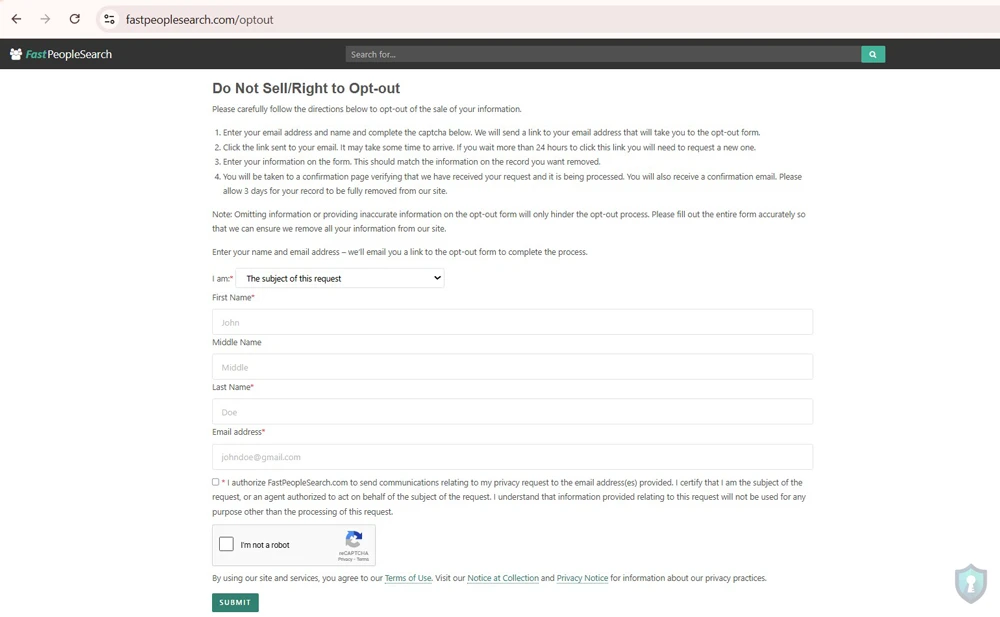
To save time, go directly to their official removal portal: URL: https://www.fastpeoplesearch.com/optout
Once there, you will see a form asking for your email address.
- Select I am: The subject of this request
- Enter your First Name.
- Enter your Last Name.
- Enter your email address.
- Check the box agreeing to the terms.
- Complete the CAPTCHA (I am not a robot).
- Click Submit to “Begin Removal Process”.
Step 2: Search for Your Record
After clicking “Begin,” the site will look like it returned to the homepage, but you are actually in a special “Removal Mode.”
- Enter your Full Name and City/State (or Zip Code) into the search bar.
- Click “Free Search”.
Step 3: The “Red Button” Removal
Once you find your profile, click “View Free Details” to open the full record.
Scroll down. Below your name and address history, looking for a Red Button that says “Remove My Record”.
Note: If you do not see this button, you likely timed out or didn’t start from the
/removallink in Step 1. Start over.
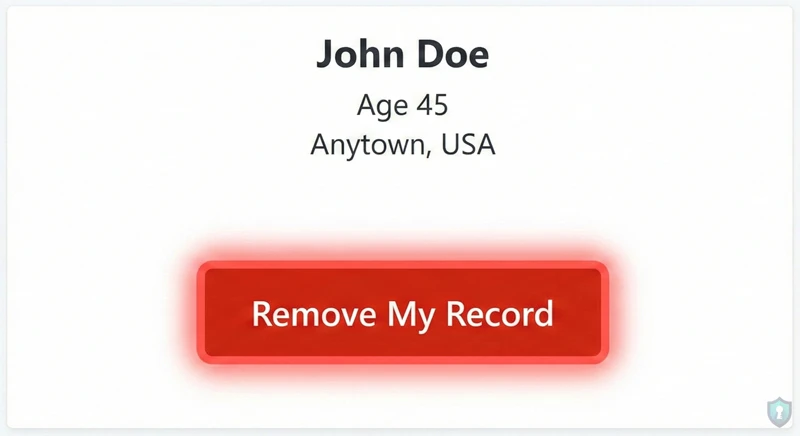
Click the button. The site will tell you that a verification email has been sent.
Step 4: The Critical Verification (Don’t Forget This!)
Your data is NOT gone yet.
FastPeopleSearch requires you to verify the request to prevent people from deleting others’ data prankishly.
- Go to your email inbox immediately.
- Look for an email from
FastPeopleSearch.com.Subject Line: “Opt-out request for FastPeopleSearch.com” - Click the link inside that says “Click here to remove [Your Name]”.
Success: You should be redirected to a page confirming your record has been removed.
Step 5: Verification & Cleanup
It typically takes 72 hours for the data to completely disappear from their servers.
We recommend setting a calendar reminder for 3 days from now.
- The Test: Go back to FastPeopleSearch.com and search for yourself again.
- The Result: You should see “No Results Found.”
What if my data comes back?
Data brokers often “re-scrape” public records. If you buy a new house or register to vote, your data might reappear in 6 months. This is why privacy maintenance is a habit, not a one-time fix.
To audit other exposures, check our Email Leak OSINT Guide to see what else hackers might know about you.
Frequently Asked Questions
Q: Is FastPeopleSearch legal?
A: Unfortunately, yes. They aggregate “Public Records” (court documents, voter registration, property deeds). In the US, this data is public. However, California residents have extra rights under the California Delete Act to force brokers to register with the CPPA.
Q: Will this remove me from Google?
A: Eventually. FastPeopleSearch will delete the page immediately, but Google’s “cache” (memory) might still show your name in search results for a week or two. The link will be dead (404 error) if anyone clicks it.
Q: Do I need to pay a service like DeleteMe or Incogni?
A: For just FastPeopleSearch? No. You can do it yourself for free using this guide. However, there are over 100 other data brokers (Whitepages, Spokeo, Radaris). Paid services are useful if you want to remove yourself from all of them at once without spending hours clicking buttons.
The Bottom Line
Your personal data is the fuel for the scam economy. By removing your profile from FastPeopleSearch, you break a critical link in the chain that scammers use to target you.
Take 5 minutes today. Delete your profile. Protect your privacy.


