
You are waiting for an Amazon order or a holiday gift. Your phone buzzes. It’s a text message that looks like it’s from the U.S. Postal Service (USPS).
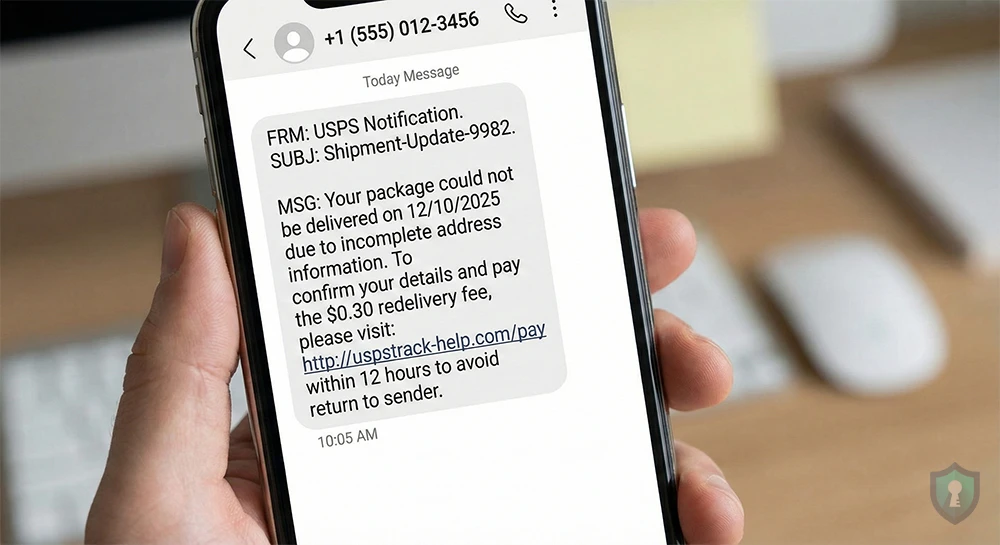
It says something like: “USPS: Your package could not be delivered due to incomplete address information. Please update your details here…” followed by a strange link.
Your instinct is to panic and click the link to fix the problem so you get your package. Stop.
This is not the USPS. This is a sophisticated SMS phishing attack (known as “Smishing”) that the U.S. Postal Inspection Service has issued official warnings about.
In this alert, we will break down exactly how this scam works, show you real examples, and explain what you must do to protect yourself.
The Anatomy of the Scam
The scammers rely on urgency. They know almost everyone has a package arriving soon, so they blast these texts out to millions of numbers, hoping to catch someone off guard.
What the Texts Look Like
These messages often come from strange, personal phone numbers (like a random Gmail address) rather than official 5-digit short codes. They almost always contain a link that does not end in .gov.
Here are real examples of the text messages people are receiving right now:
Example 1: The “Warehouse” Variation
“[USPS Notification]: Your parcel is currently at our warehouse. We cannot deliver due to incorrect house number. Please confirm here: uspstrack-help.com/usps”
Example 2: The “Suspension” Variation
“USPS Final Notice: Delivery has been suspended for your item. Action required. Click to reschedule: smishing-link.net/track-package”
The Goal: The $0.30 Redelivery Trap
If you click the link, you won’t be taken to USPS.com. You will be taken to a high-quality fake website that looks identical to the real postal service tracking page.
It will ask for your name and address to “confirm” the delivery. Then comes the trap.
The site will claim you need to pay a very small “redelivery fee” usually something insignificant like $0.30 or $1.15 to release the package.
Why Do They Want $0.30?
They don’t want thirty cents. They want your credit card number.
Once you enter your card details to pay the small fee, the scammers capture that information. They will either use it immediately for large fraudulent purchases or sell your card details on the dark web to other criminals.
Actionable Intel: What to Do If You Receive This Text
If one of these messages lands on your phone, follow this protocol immediately:
1. Do NOT Click the Link
This is rule number one. Clicking links in unsolicited texts can sometimes download malware onto your device, even if you don’t enter any information.
2. Check the Official Source
If you are genuinely worried about a package, close your text app. Open your browser and type in USPS.com directly. Use the legitimate tracking number provided by the merchant you bought from (e.g., Amazon, eBay). If there is a real issue, the official site will tell you.
3. Report and Delete
Just like the “Wrong Number” texts, engaging with these messages only confirms your number is active.
- Forward the text to 7726 (SPAM) on most carriers.
- Block the sender.
- Delete the message.
You can also report the scam message directly to the Federal Trade Commission (FTC) to help track these criminals.
The Bottom Line
The official USPS will never send you a text message with a link asking for a fee to redeliver a package. If you are asked to pay money to get mail, it is a scam 100% of the time. Stay vigilant, and follow the FCC’s official advice to avoid the temptation of clicking these links..


