
Every day, the headlines get scarier. “23andMe Hacked.” “Ticketmaster Data Breach.” “New AI Scam Steals Millions.”
It feels overwhelming. You want to be safe, but you don’t have time to become a cybersecurity expert. You just want a plan.
This is your plan.
We have compiled the essential 10-Step Checklist to lock down your digital life. This isn’t theoretical advice; these are the exact tools and techniques we have covered in our detailed guides, distilled into a single roadmap.
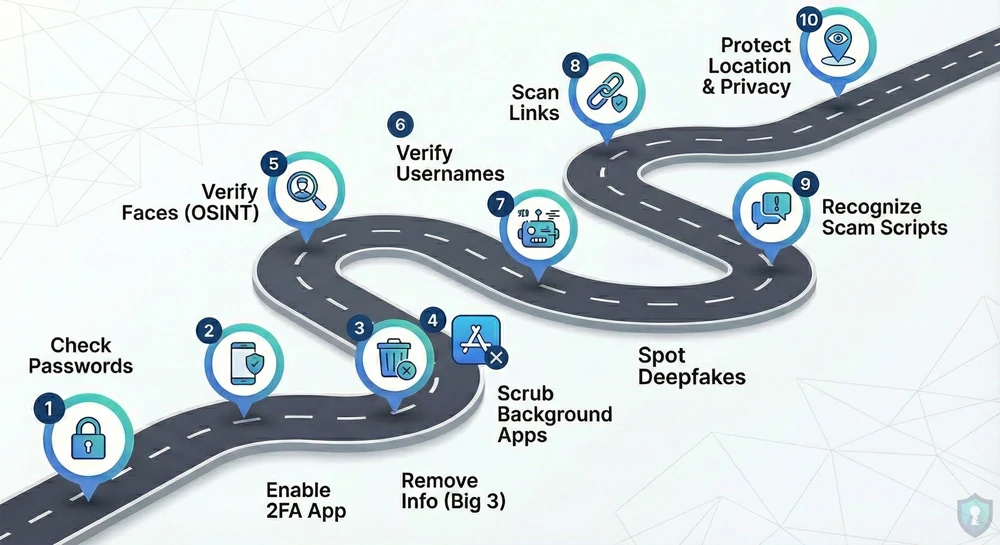
If you only read one article on The Intel Hub, make it this one.
Phase 1: Lock Down Your Accounts
The first line of defense is your login credentials. If these are weak, nothing else matters.
1. Check for Leaked Passwords
Hackers don’t “guess” passwords anymore; they just buy old ones from the Dark Web.
- The Action: Use a breach scanner to see if your email is compromised.
- The Guide: Is Your Password on the Dark Web? (How to Check)
2. Enable “App-Based” 2FA
SMS text messages can be intercepted via “SIM Swapping.”
- The Action: Switch your 2-Factor Authentication (2FA) from SMS to an app like Google Authenticator or Authy. It generates a code locally on your phone that hackers cannot intercept remotely.
Phase 2: Delete Your Digital Footprint
Your personal data is currently listed for free on dozens of “Data Broker” websites. Let’s scrub it.
3. Remove Yourself from the “Big 3” Directories
Sites like Whitepages and Spokeo list your home address and family members publicly.
- The Action: Opt out of the biggest directories immediately.
- The Guide: How to Remove Your Info from Whitepages & Spokeo
4. Scrub the “Background Check” Apps
Apps like “BeenVerified” are used by stalkers to find deep background info on you.
- The Action: Use the hidden “backdoor” removal tools.
- The Guide: How to Delete Yourself from BeenVerified & TruePeopleSearch
Phase 3: Master the Art of Verification (OSINT)
In 2026, you cannot trust your eyes. You must verify everything.
5. Verify Faces (Reverse Image Search)
Talking to a stranger online? Their photo might be stolen from a model or an influencer.
- The Action: Run their profile photo through a face search engine.
- The Guide: Is That Profile Fake? Reverse Image Search Guide
6. Verify Usernames
Scammers often reuse usernames across different sites, or use random bot-generated handles.
- The Action: Check if their username exists on other platforms to build a “character dossier.”
- The Guide: How to Find Anyone’s Social Media by Username
7. Spot the “Deepfakes”
AI is now creating fake photos of people that look 99% real.
- The Action: Look for the “glitches” (6 fingers, melted text, waxy skin).
- The Guide: How to Spot AI-Generated Images
Phase 4: Scam Defense
The best antivirus is your own brain. Know the threats before they arrive.
8. Scan Links Before Clicking
Received a text from “USPS” or “Netflix”? It’s likely a trap.
- The Action: Never click blindly. Copy the link and scan it for viruses first.
- The Guide: How to Check if a Link is Safe (VirusTotal Guide)
9. Recognize the Scripts
Scammers use scripts. If you know the script, you can’t be tricked.
- The “Wrong Number” Text: Leads to the Pig Butchering Crypto Scam.
- The “Hi Mum” Text: Pretends to be your child in an emergency. (Read the Guide)
- The “Geek Squad” Email: Tries to panic you about a fake charge. (Read the Guide)
Phase 5: Physical Privacy
Your digital safety extends to the real world.
10. Protect Your Location & Privacy
- Exif Data: Scrub your photos before sending them, so you don’t accidentally reveal your GPS coordinates. (Guide Here)
- Hidden Cameras: Inspect your Airbnb or hotel room for spy devices. (Guide Here)
The Bottom Line
Security is not a destination; it is a habit.
You don’t have to do all 10 steps today. Bookmark this page. Do one step a week. Start by checking your passwords, then move on to deleting your data.
By the time you finish this list, you will be harder to hack, harder to track, and impossible to scam.




