
In 2024 alone, researchers estimate that over 1.7 billion personal records were exposed in data breaches globally.
Most people assume that hackers only target “high-value” victims like CEOs or politicians. This is a dangerous misconception. In reality, modern cybercrime is automated. Hackers don’t target you specifically; they target databases.
Once they steal a database from a vulnerable site-even a harmless one like a fitness app or a food delivery service-they use automated scripts to test those email/password combinations on thousands of other websites, including banks, Amazon, and PayPal.
This technique is called Credential Stuffing, and it is the #1 reason legitimate accounts get hacked. It is also how scammers obtain the phone numbers used in the “Wrong Number” Text Scams we recently exposed.
In this guide, we will use Open Source Intelligence (OSINT) tools-the same ones security professionals use-to audit your digital footprint and see if your data is currently for sale on the dark web.
Step 1: The Gold Standard (HaveIBeenPwned)
The first step in any digital audit is HaveIBeenPwned (HIBP).
Created by security expert Troy Hunt, this free resource is the industry standard for tracking data breaches. It aggregates data from thousands of known leaks so you can safely check if your email was included.
How to Audit Your Email
- Go to haveibeenpwned.com.
- Enter your primary email address.
- Click on “Check”.

If the screen turns GREEN: Good news. Your email has not been found in the databases HIBP tracks.
If the screen turns RED: This means your data was exposed. Scroll down to see exactly which breach you were caught in and what data was taken (e.g., passwords, phone numbers, physical addresses).
The “Chain Reaction”: Why One Leak Matters
You might look at a breach from an old site like “MySpace” or “Canva” and think, “I don’t care about that account.”
This is exactly what hackers are banking on.
The danger isn’t that they hack your old social media account. The danger is that 65% of people reuse passwords. If you used the same password for that old account as you do for your Gmail or Bank of America account, the hackers now have the keys to your entire digital life.
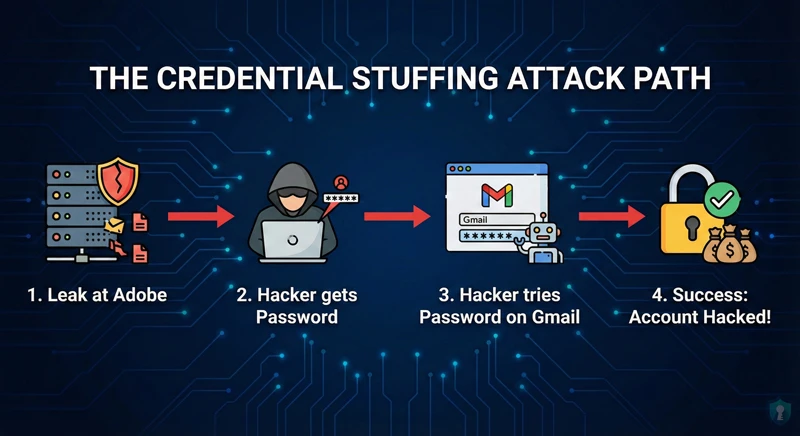
The Intel Lesson: Data breaches are fuel. A password stolen from a 2018 gaming forum can be used to drain a bank account in 2025.
Step 2: Going Deeper (DeHashed & Mozilla Monitor)
While HaveIBeenPwned tells you if you were breached, advanced OSINT tools can sometimes tell you what the hackers can see.
DeHashed (The Investigator’s Tool)
For a deeper audit, security researchers often use DeHashed. It is a search engine for breached assets.
- How it works: You can search by email, username, or even phone number.
- The Value: It often shows whether the password exposed was “hashed” (encrypted) or “plaintext” (readable).
- Warning: Only search for your OWN data. Using OSINT tools to investigate others without authorization can be a violation of privacy laws.
Mozilla Monitor (User-Friendly)
Formerly known as Firefox Monitor, this tool uses the HIBP database but adds a layer of user-friendly alerts. You can sign up to get notified automatically the next time your email appears in a breach.
Actionable Intel: Remediation (The Fix)
If you found your email on a list, do not panic. Follow this strict remediation protocol immediately:
1. The “Nuclear” Password Reset
If a password was exposed, consider it burned. You must change that password everywhere you have used it. Do not just change it on the breached site; change it on every site that shares that password.
2. Enable 2FA (Two-Factor Authentication)
This is your strongest defense. Even if a hacker buys your valid email and password on the dark web, Multi-Factor Authentication stops them cold. They cannot login without the code from your phone or authenticator app.
The Ultimate Defense: Password Managers
The only way to be safe from Credential Stuffing is to never reuse a password. But how can you remember 50 unique, complex passwords?
You don’t. You use a Password Manager.
Security professionals recommend tools like Bitwarden (Free & Open Source) or 1Password. These tools generate impossible-to-guess passwords for every site you visit and remember them for you. You only need to remember one “Master Password.”
Frequently Asked Questions
Q: What does “Pwned” mean?
A: The term “Pwned” originated in gaming culture as a typo for “Owned” (meaning to be defeated or dominated). In cybersecurity, it means your defenses have been breached and an attacker has “owned” your account.
Q: Can I delete my data from a breach?
A: Unfortunately, no. Once data is leaked onto the dark web, it is copied and shared thousands of times. You cannot remove it; you can only change your locks (passwords) so the stolen keys no longer work.
Q: Is it safe to type my email into these checker sites?
A: Yes, reputable sites like HaveIBeenPwned and Mozilla Monitor are run by security professionals. They do not store the email you enter; they simply check it against their existing database of “hashes” (anonymized data).
The Bottom Line
Ignorance is not bliss. In the world of cybersecurity, what you don’t know can hurt you. Knowing you have been breached gives you the advantage-it allows you to change your credentials before a criminal has the chance to use them.
Your Mission: Go to HaveIBeenPwned right now. If it’s red, start changing your passwords.



