
You check your inbox and see a shocking subject line: “Thank you for your order” or “Subscription Renewal Processed.”
You open the email to find a receipt from “Geek Squad” claiming you have been charged $399.99 (or sometimes $499) for a “Total Tech Support” or “Antivirus Protection” renewal.
You didn’t order this. You panic. You look for a way to cancel.
Conveniently, the email highlights a customer support phone number: “To cancel this order, call us immediately at +1 (888) XXX-XXXX.”
Stop. Do not call that number.
There is no order. There is no charge. This is the Geek Squad Refund Scam, a dangerous trap designed to empty your bank account.
In this alert, we will deconstruct exactly how this scam works, why they want you to call, and how to verify the email is fake in seconds.
The Trap: Why They Want You to Call
Unlike standard phishing emails that want you to click a link, this scam wants you to pick up the phone.
Why? Because it is easier to manipulate someone verbally than via text.
The “Refund” Script
If you call the number, you won’t reach Best Buy. You will reach a call center operated by scammers.
- The Setup: They will apologize and promise to refund the $399.
- The Access: They will claim they need to connect to your computer remotely (using tools like AnyDesk or TeamViewer) to process the refund.
- The “Mistake”: Once they control your screen, they will ask you to log into your bank. They will then edit the HTML of your banking page to make it look like they accidentally refunded you $39,999 instead of $399.
- The Guilt Trip: They will panic, cry, or threaten you, claiming they will lose their job unless you send the “extra” money back via wire transfer, Bitcoin, or gift cards.
It sounds unbelievable, but it happens to thousands of people every day.
The Federal Trade Commission (FTC) warns that these tech support refund scams are specifically designed to panic you into acting quickly.
Anatomy of the Fake Email (Red Flags)
You can spot these fake invoices instantly if you know what to look for.
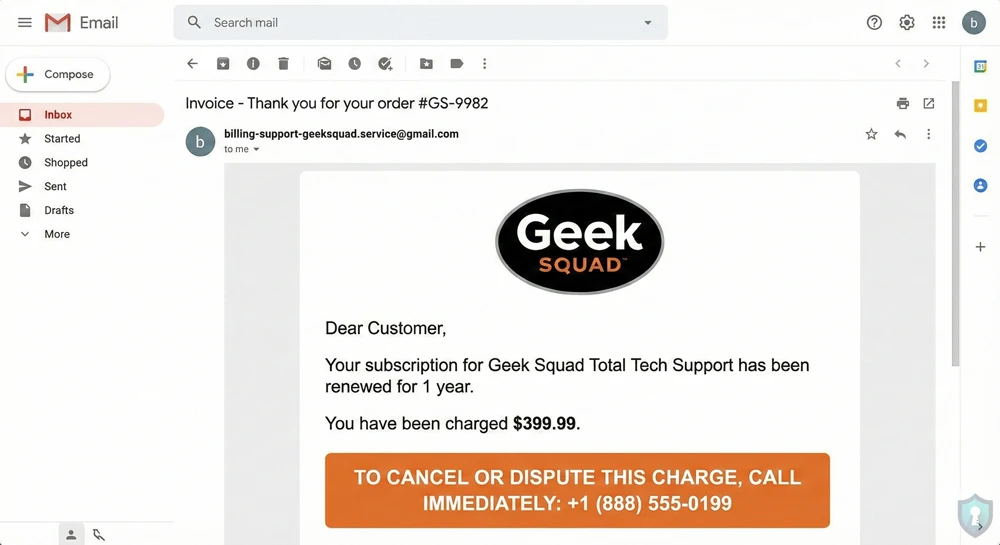
- The Sender Address Look closely at the “From” email address. Real Geek Squad emails come from BestBuy.com or GeekSquad.com. You can verify these official communication channels directly on Best Buy’s cybercrime & fraud support page.
● Fake: [email protected]
● Fake: [email protected] - The Greeting Legitimate companies usually use your name. Scammers use generic greetings like “Dear Customer” or “Hello User” because they are blasting this email to millions of people at once.
- The Urgency The email is designed to make you act without thinking. Phrases like “You have 24 hours to dispute this charge” are a major red flag.
What To Do If You Receive This Email
1. Check Your Bank (Independently)
Do not trust the email. Open your banking app or credit card statement separately. You will see that no charge of $399 exists. If there is no charge, there is no problem.
2 Do Not Call the Number
Calling confirms your phone number is active and tags you as a gullible target. You will likely be bombarded with more spam calls in the future.
3. Report It
- To Best Buy: Forward the scam email to [email protected].
- To Your Email Provider: Mark the message as “Phishing” or “Spam” so your provider learns to block it next time.
- If you lost money to this scam, you should file a report immediately with the FBI’s Internet Crime Complaint Center (IC3).
What If You Already Called Them?
If you called the number and gave them remote access to your computer:
- Disconnect Immediately: Turn off your Wi-Fi or unplug your internet cable.
- Contact Your Bank: Tell them you may be a victim of a “Remote Access Scam” and monitor your accounts.
- Scan for Malware: The scammers may have left “backdoor” software on your PC. Use a reputable antivirus scanner to clean your machine.
The Bottom Line
Real companies do not send invoices for products you never bought, and they definitely don’t demand you call them to cancel. If an email tries to scare you with a high price tag, take a deep breath and check the sender address. When in doubt, delete it.



