

You can still see their posts. You can still watch their Stories. You haven’t been blocked.
But something feels… off.
They don’t reply to your comments anymore. Your DMs sit on “Sent” for days, even though you see them posting active Stories.
You have likely been Restricted.
Instagram introduced “Restrict” as an anti-bullying feature. It is a “Soft Block”-a way to silence someone without them knowing. Because there is no notification, it is incredibly difficult to detect.
Difficult, but not impossible.
In this guide, we will show you the 3 signs that prove you have been restricted, including the one “Forensic Test” that confirms it 100%.
Sign #1: The “Activity Status” Blackout
When you are restricted, Instagram hides the user’s “Active Now” status (the green dot) from you.
The Test:
- Go to your DMs with the person.
- Look at the top, under their name.
- Normal: You see “Active 15m ago” or “Active Now.”
- Restricted: It is completely blank.
False Positive Warning:
They might have just turned off their Activity Status in settings. This is a clue, not proof.
Sign #2: The “Ghost DM” (Sent vs. Seen)
This is the most frustrating part of being restricted. You can still message them, but your messages are moved to a hidden “Requests” folder.
The Test:
- Send a DM.
- Wait.
- Normal: Eventually, you will see a “Seen” label when they open it.
- Restricted: It will stay on “Sent” forever. Even if they read it, Instagram will never show you the “Seen” receipt.
Why this happens: Restricted users have to “Approve” your message to see it. Most don’t bother; they just read the preview and ignore it.
Sign #3: The “Alt Account” Comment (The 100% Proof)
This is the only way to be certain.
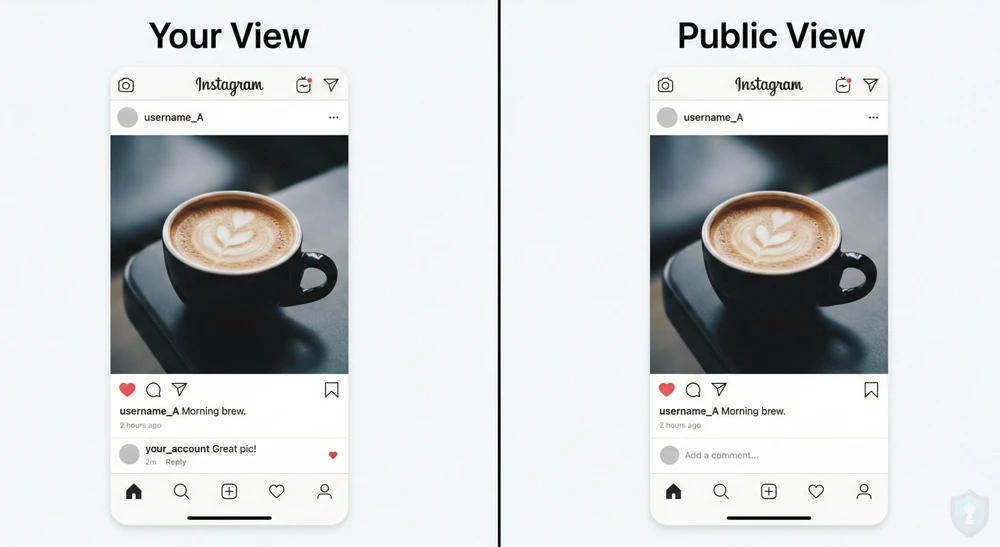
When you are restricted, you can still comment on their posts. To you, the comment looks normal. But to everyone else (and the account owner), the comment is invisible.
The Forensic Test:
- Step 1: Leave a comment on their recent photo using your main account. (Make it something neutral, like “Nice photo!”).
- Step 2: Immediately switch to a Secondary Account. (If you don’t have one, check our guide on how to spot fake profiles to see how easily they are made).
- Step 3: Go to that same photo and look for your comment.
The Verdict:
- If you CAN see your comment: You are safe. They just haven’t replied.
- If you CANNOT see your comment: You are definitely Restricted. Your comment is in a “hidden” limbo that only you can see.
FAQ: What Can They Actually See?
There is a lot of confusion about what “Restrict” actually does compared to “Block.”
| Feature | Blocked 🚫 | Restricted ⚠️ |
|---|---|---|
| Can you see their Profile? | No | Yes |
| Can you see their Stories? | No | Yes |
| Can you DM them? | No | Yes (But it goes to Requests) |
| Can you Comment? | No | Yes (But it’s invisible to others) |
| Do they get notified? | No | No (Silent) |
The Bottom Line
If you can still see their posts and Stories, but your comments are invisible to your friends and your DMs are never “Seen,” you have been restricted.
Do not confront them. The entire point of the feature is to avoid drama. If you ask, “Did you restrict me?” they can simply lie and say, “No, I just missed your message.”
Take the hint, and move on. (And if you are tempted to screenshot their posts for evidence, read our Instagram Screenshot Guide first so you don’t get caught!)



