
You get a friend request from a stranger. They are attractive, successful, and seem interested in you.
Or maybe you see a political account posting 500 times a day about a controversial topic.
Is it a real person? Or is it a Bot designed to spread misinformation, or a Catfish trying to steal your money?
In the world of OSINT (Open Source Intelligence), we don’t guess. We verify.
In this guide, we will give you the 5-Point Checklist to instantly spot a fake profile on Instagram, Facebook, X (Twitter), or LinkedIn.
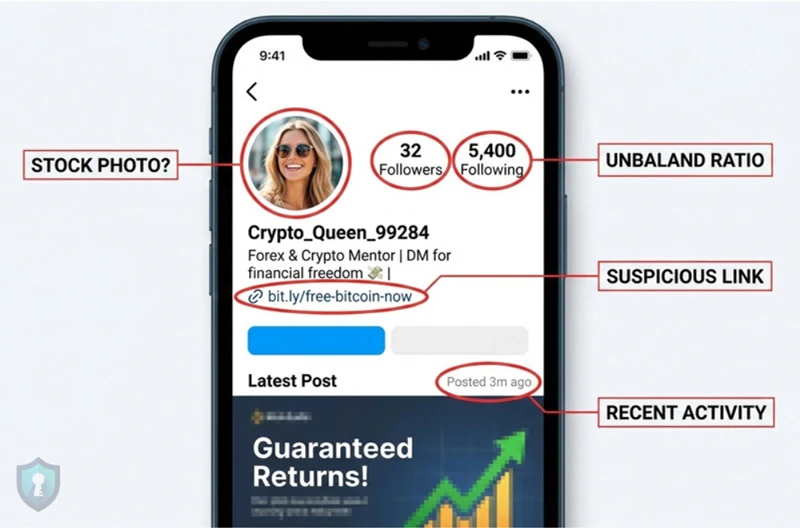
Sign 1: The “Perfect” Photo
The most obvious sign of a fake profile is the profile picture.
- The Stock Model: Is the photo professionally lit, perfectly posed, or look like it belongs in a magazine?
- The Stolen Selfie: Does it look slightly blurry or pixelated? (This happens when scammers screenshot someone else’s photo).
How to Check: Don’t trust your eyes. Use our Reverse Image Search Guide to scan their face. If that photo appears on a stock photo site or belongs to a German fashion influencer, you are talking to a scammer.
Sign 2: The Generic Username
Real people usually have consistent handles (e.g., JohnSmithNY or JSmith_Design). Bots often use randomly generated handles.
Red Flags:
- Numbers:
Sarah_938472 - Nonsense:
User_Xy7z - Mismatch: The name says “Emily,” but the URL says
facebook.com/robert.jones.55(This means they hacked an old account and changed the name).
How to Check: Run their handle through the tools in our Username Search Guide. If that username doesn’t exist anywhere else on the internet, be suspicious.
Sign 3: The “Zombie” Timeline
Look at when they post.
The “Born Yesterday” Account: The profile was created 3 days ago, but has 5,000 followers. (They likely bought fake followers).
The “Sleeper” Account: The account posted in 2018, went silent for 5 years, and suddenly started posting about Crypto or Politics yesterday. (This often means a hacked account).
The Department of Homeland Security warns that bots often post at inhuman speeds sometimes hundreds of times a day, at all hours of the night.
Sign 4: The “Crypto” Pivot
Does their bio or timeline mention investing?
- “Ask me how I made $10k”
- “Forex Trader”
- “Crypto Mentor”
If a stranger slides into your DMs to talk about money, it is always a trap. As we covered in our Pig Butchering Scam Guide, wealthy investors do not hunt for random partners in Instagram comments.
Sign 5: The “Link in Bio” Trap
Fake profiles often exist for one reason: to get you to click a link.
- Adult Bots: “Check my private photos [Link]”
- Scam Bots: “I’m giving away free iPhones [Link]”
Never click these links blindly. If you are curious, use the tools in our Link Safety Guide (VirusTotal/UrlScan) to see where the link actually goes without exposing yourself to malware.
Summary: The “T.R.U.S.T.” Test
If you aren’t sure, use this quick acronym:
- Timing: Was the account created recently?
- Reverse Search: Does the photo belong to someone else?
- Username: Is it random numbers (
User7392)? - Sales: Are they trying to sell you crypto or adult content?
- Too Good to be True: Is a supermodel really DMing you?
The Bottom Line
The internet is full of noise. By taking 60 seconds to check a profile’s photo, creation date, and username, you can separate the real connections from the digital fakes.




