
You just matched with someone on a dating app. Their profile says their name is “Mike,” but their username is MikeRuns2024.
Or maybe you are buying a camera on a forum from a user named PhotoGuy_NY.
Is this person real? Do they have a hidden digital life?
One of the fundamental rules of Open Source Intelligence (OSINT) is Username Correlation. Most people (and even lazy scammers) reuse the same unique username across dozens of websites.
These are the same digital investigation techniques used by top organizations like Bellingcat to verify online identities.
In this guide, we will show you how to take a single username and instantly find every other social network, forum, and dating site that person is using for free.
Method 1: The “Lazy” Search (Google Dorks)
Before using specialized tools, ask Google. But don’t just type the name; use search operators (also known as Google Dorks) to filter the noise.
The Technique: Put the username in quotation marks to force an exact match.
- Search: “username”
- Example: “MikeRuns2024”
The “Site” Filter: If you want to check if they are on a specific platform, add the site: operator.
- Search: “MikeRuns2024” site:instagram.com
- Search: “MikeRuns2024” site:reddit.com
This tells Google to search only inside Instagram or Reddit for that exact text.
Method 2: The Professional Tool (WhatsMyName)
If you want to check 500+ websites at once, you need a dedicated enumeration tool.
While the OSINT Framework lists hundreds of options, the industry standard for web-based investigations is WhatsMyName. It is free, fast, and highly respected in the OSINT community.
How to use it:
- Go to WhatsMyName.app.
- Type the target username into the search bar.
- Click the “Search” button.
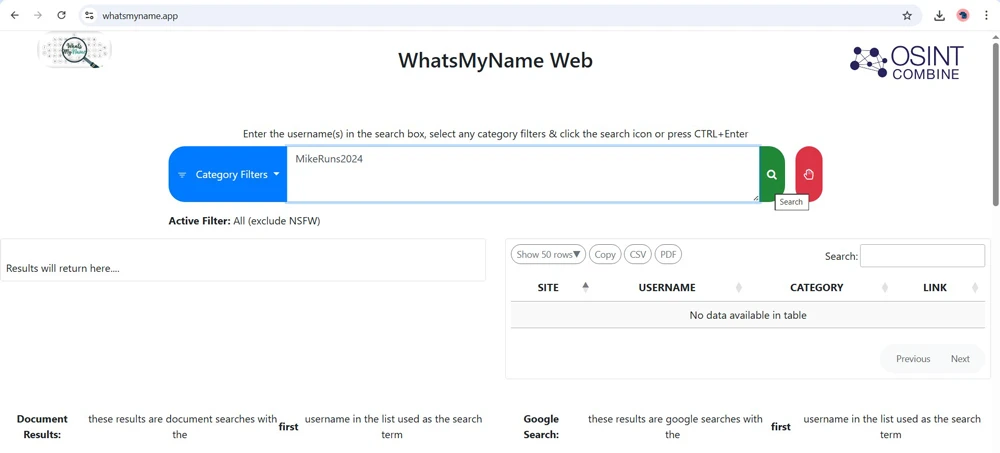
What happens: The tool will query hundreds of sites—from mainstream ones like Twitter and GitHub to niche sites like Roblox, Duolingo, and Pornhub to see if that username exists.
Why this is powerful: If you find MikeRuns2024 on a running forum, a LinkedIn profile, and a local news comment section, you can start to build a picture of who this person really is.
Method 3: The Manual URL Trick
Sometimes, tools miss things. You can manually check major networks by typing the username directly into the address bar of your browser.
This is often the fastest way to check the “Big 3” social networks.
- facebook.com/username
- x.com/username
- instagram.com/username
If the page loads a profile, you have a match. If it says “404 Not Found,” the username is free or the account is private/deleted.
Deep Dive: See OSINT in Action
Want to see how professional investigators use these tools? This presentation from Bellingcat demonstrates their complete Online Investigation Toolkit in real-world scenarios.
Video Source: YouTube/Presenting: The Bellingcat Online Open Source Investigations Toolkit
The “False Positive” Warning
Warning: Just because you find the username MikeRuns2024 on Pinterest, it doesn’t guarantee it is the same Mike.
- Unique Usernames: A complex name like Xavier_Tech_Support_88 is likely the same person everywhere.
- Common Usernames: A name like Mike1990 might belong to thousands of different people.
Always look for secondary evidence like a matching profile picture, location, or bio text to confirm it is the same person.
The Bottom Line
Your username is a digital fingerprint. By tracking it across the web, you can verify if an online seller is reputable, if a date is who they say they are, or if a “stranger” is actually someone you know.



