If you spend any time on the internet, you have undoubtedly seen an advertisement for a Virtual Private Network (VPN). Aggressive marketing campaigns promise that buying their software will give you “military-grade encryption,” make you “100% invisible to hackers,” and erase your digital footprint entirely.
While a VPN is an absolute necessity for modern digital hygiene, it is not a magic invisibility cloak. For Open Source Intelligence (OSINT) researchers and privacy advocates, understanding the exact technical limits of a VPN is just as important as using one.
🛡️ Investigator Verified: NordVPN
Never conduct OSINT research or browse the Dark Web without encrypting your traffic. Your ISP logs your activity by default. We use and recommend NordVPN for its 100% RAM-only servers and strict zero-log jurisdiction.
30-Day Money-Back Guarantee
Here is the no-nonsense truth about how a VPN actually works, what it protects, and the dangerous privacy myths you need to stop believing.
The Encrypted Tunnel: How a VPN Works
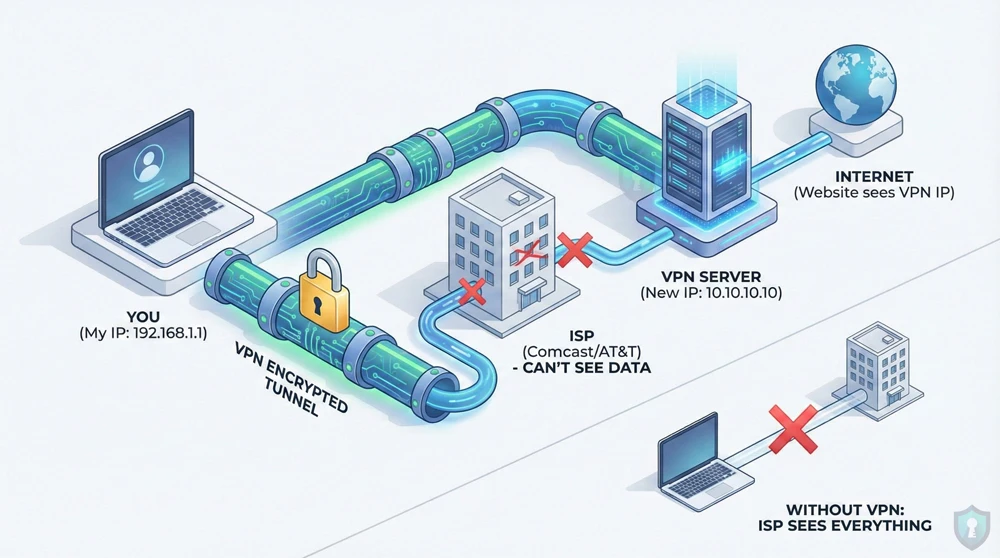
When you type a website into your browser without a VPN, your device sends a direct request to your Internet Service Provider (ISP)-like Comcast or AT&T. Your ISP connects you to the website. Because they facilitate the connection, your ISP can see exactly what websites you visit, and the website can see exactly what your physical IP address is.
When you turn on a VPN, you change the route:
- The Tunnel: The VPN software on your device scrambles your data into an unreadable format (encryption).
- The Bypass: This encrypted data travels through your ISP. Your ISP can see that you are sending data, but because it is encrypted, they have no idea what the data is or where it is going.
- The Server: Your data arrives at a server owned by the VPN company (which could be located in another country). The server decrypts your data and sends it to the website.
- The Mask: The website sees the request coming from the VPN server’s IP address, not your real home IP address.
What a VPN Actually Protects
When configured correctly, a reputable VPN acts as a critical layer of defense against mass surveillance and opportunistic hackers.
- Public Wi-Fi Snooping: If you connect to an unsecured Wi-Fi network at a coffee shop or airport, hackers can use packet-sniffing software to steal your passwords in mid-air. A VPN encrypts your traffic, turning your data into useless gibberish to anyone trying to intercept it.
- ISP Data Harvesting: In many countries, ISPs are legally allowed to log your browsing history and sell it to advertising data brokers. A VPN completely blinds your ISP to your online activities.
- IP Address Masking: A VPN hides your physical location. If a malicious actor tries to track your IP address, they will trace it back to a random data center rather than your personal router.
The Dangerous Myths (What a VPN CANNOT Do)
Relying on a VPN for absolute anonymity is a fatal Operational Security (OPSEC) mistake. Here is what a VPN cannot protect you from.
1. It Does Not Make You “100% Anonymous”
A VPN hides your IP address, but it does not hide your identity if you freely give it away. If you connect to a VPN and then log into your personal Google or Facebook account, those companies still know exactly who you are. Furthermore, websites track you using “browser fingerprinting” and tracking cookies, which a VPN does not block.
2. It Does Not Protect You From Malware
A VPN secures the transport of your data, not the data itself. If you click on a phishing link or download a malicious file, a VPN will simply help you download that virus securely. To avoid these threats, you must actively check if a link is safe using scanning tools before you click.
3. It Is Not a Replacement for Tor
A VPN routes your traffic through a single server. If the VPN company decides to log your activity, your privacy is compromised. If you are a whistleblower or researcher requiring absolute, untraceable anonymity, a single-hop VPN is not enough. You must use a decentralized multi-hop network like the Tor Browser or an amnesic system like Tails OS.
Summary: The OPSEC Reality Check
| Threat Vector | Does a VPN Protect You? |
|---|---|
| Coffee Shop Wi-Fi Hackers | ✅ Yes (Traffic is encrypted) |
| ISP Browsing History Logging | ✅ Yes (ISP only sees encrypted data) |
| Phishing Emails & Malware | ❌ No (You can still download viruses) |
| Google/Meta Data Tracking | ❌ No (Cookies and account logins bypass VPNs) |
The Bottom Line
Just as Signal provides end-to-end encryption for your text messages, a VPN provides an encrypted tunnel for your general web browsing. It is a mandatory first step for protecting your digital footprint, but it is only one piece of a comprehensive privacy strategy.
Frequently Asked Questions (FAQs)
Does a VPN hide my search history from Google?
⚡ Exclusive OPSEC Discount
Military-grade encryption shouldn't break the bank. Avoid data-harvesting "free" apps and secure your digital footprint with a premium, audited no-log VPN. Lock in the lowest possible rate using our exclusive investigator link.
Special offer applies automatically.
No. If you are logged into your Google account while using a VPN, Google still records every search you make and links it directly to your profile. A VPN only hides your physical IP address from Google; it does not stop account-level data collection.
Can my internet provider see that I am using a VPN?
Yes. Your Internet Service Provider (ISP) can see that your connection is being routed to a known VPN server, and they can see the volume of data you are transferring. However, because the data is encrypted, they cannot see the actual websites you are visiting or the files you are downloading.
Are VPNs legal to use?
In most of the world, including the US, UK, and Europe, downloading and using a VPN is 100% legal. However, highly restrictive regimes (like China, Russia, and Iran) heavily restrict or ban the use of unauthorized VPNs to maintain strict control over citizen internet access.
🔒 Don't Leave Your Network Exposed
You now have the intelligence to protect yourself, but knowledge without action is a vulnerability. Before you navigate away to start your research, ensure your connection is mathematically encrypted and hidden from third-party tracking.
Setup takes less than 2 minutes.